Virtual shifting without Zwift
Use SRAM AXS Blips through a supported rear derailleur or compatible Shimano Di2 D-Fly buttons to control 24 virtual gears. Ride with a Cog or a suitable gear on your cassette. Your phone is another controller option.
Download KOMRIDER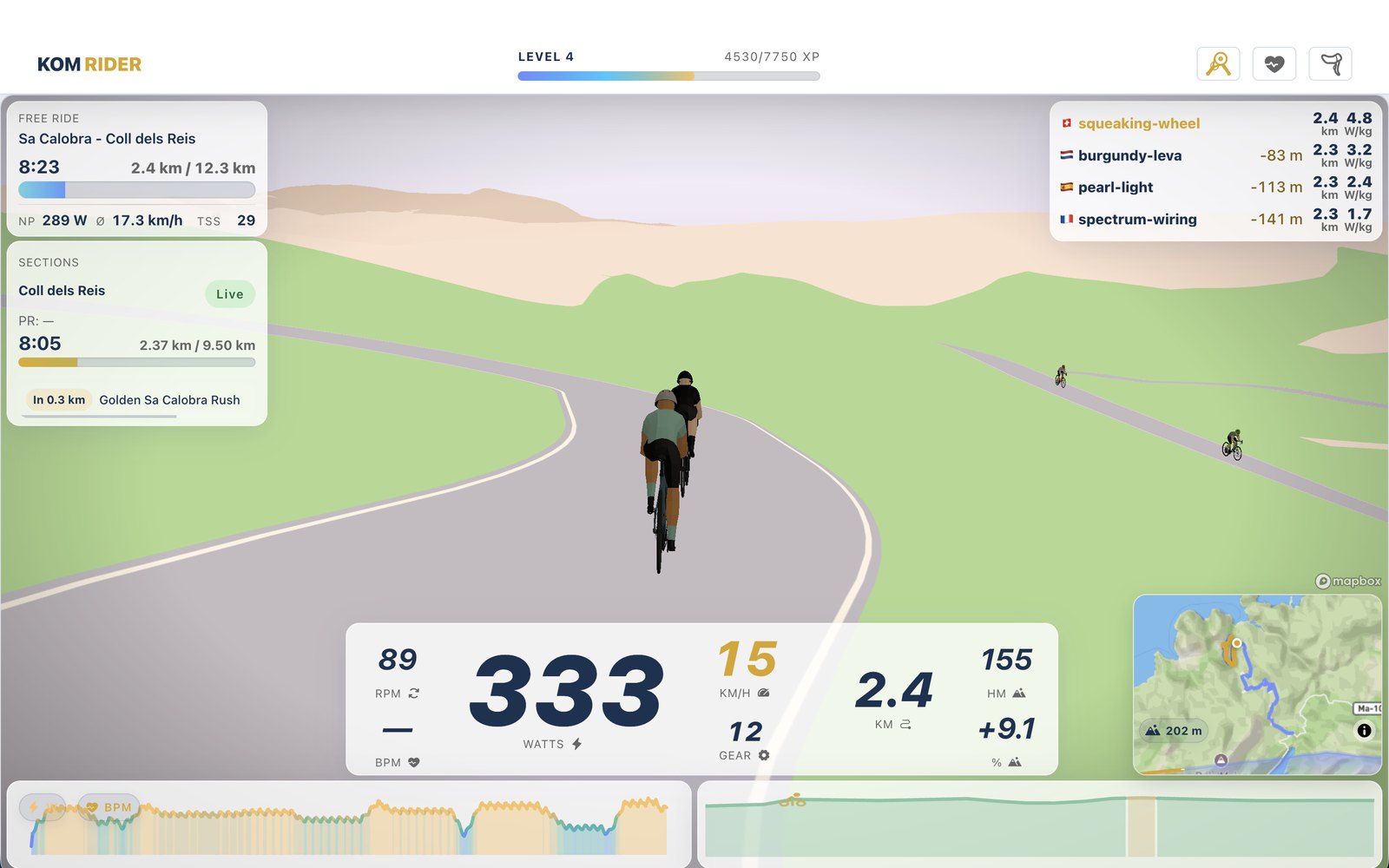
Connect your compatible smart trainer by Bluetooth or ANT+ FE-C, then pair a supported controller. On a virtual route, the buttons change virtual gears; in an ERG workout, they adjust training intensity. Virtual routes require Premium.
Key benefits
24 virtual gears
Change trainer resistance to find a gear that suits your cadence on a virtual route.
Use supported handlebar buttons
Use SRAM AXS Blips through a supported rear derailleur or compatible Shimano Di2 D-Fly buttons. Assign easier and harder during setup.
Your phone as a shifter
Use a Cog or a suitable cassette gear. Pair your phone by QR code and shift with the large easier and harder buttons.
Workout intensity from the same controls
In ERG mode, adjust target-power intensity rather than shifting virtual gears.
What virtual shifting changes
Virtual shifting changes resistance on your smart trainer. In KOMRIDER, easier and harder move you through 24 virtual gears.
Use a Cog or select a suitable gear on your cassette. The chain stays on the same sprocket as you change virtual gears with your controller. Your smart trainer adjusts resistance.
SRAM AXS Blips and Shimano Di2 D-Fly
KOMRIDER receives your SRAM AXS Blip inputs through a supported rear derailleur. Pair the derailleur, then assign the Blips to easier and harder during setup.
With compatible Shimano Di2 buttons, use D-Fly channels. Assign the buttons to easier and harder in setup and test the inputs before your ride.
Turn your phone into a virtual shifter
Open the phone-shifter setup in KOMRIDER. Scan the QR code with your phone and pair the devices. Keep your phone and computer on the same Wi-Fi network.
Use a Cog or select a suitable gear on your cassette. Then shift easier or harder with the large buttons on your phone. This gives a mechanically shifted bike virtual gears on a compatible smart trainer.
- Run KOMRIDER on your Windows PC or Apple Silicon Mac
- Keep phone and computer on the same Wi-Fi
- Pair using the QR code shown by KOMRIDER
- Use the phone controls in portrait or landscape
Cog, cassette and controller
A Cog or a suitable cassette gear keeps the chain on one sprocket. Your controller sends the shift input, and KOMRIDER changes resistance on the compatible smart trainer.
Use your phone, SRAM AXS Blips through a supported derailleur, or compatible Shimano Di2 D-Fly buttons as the controller.
Virtual routes and ERG workouts use different controls
On virtual routes, buttons select a virtual gear and change resistance. Route riding requires Premium. In an ERG workout, the trainer follows power targets, so easier and harder adjust workout intensity instead of selecting a virtual gear.
You can use phone controls for map-free ERG workouts with KOMRIDER Free. Free also includes a limited monthly allowance for AI workout and training-plan generation; it does not include virtual maps or routes.
| Mode | Button effect | Plan |
|---|---|---|
| Virtual route | Change virtual gear | Premium |
| ERG workout without a map | Adjust workout intensity | Free or Premium |
| Workout on a virtual route | Adjust workout intensity in power intervals | Premium |
Check the trainer connection first
KOMRIDER supports compatible Bluetooth trainers and ANT+ FE-C trainers on the desktop. ANT+ FE-C trainers and ANT+ heart-rate monitors need a compatible USB adapter. The controller connection is separate from the trainer connection.
Confirm that KOMRIDER can control your trainer, then pair a supported controller and test its inputs. If a handlebar button still shifts the bike physically, check its setup before relying on it as a virtual control.
Frequently asked questions
Can I use virtual shifting without a Zwift subscription?
Yes. KOMRIDER supports virtual shifting with compatible trainers and its supported controllers. A Zwift subscription is not required; KOMRIDER Premium is needed for virtual route riding.
Can I use a phone with mechanical shifting?
Yes. Use a Cog or select a suitable gear on your cassette, then shift virtually from your phone. This works with a mechanically shifted bike on a compatible smart trainer. Phone and computer must share the same Wi-Fi network.
Does a Zwift Cog work with KOMRIDER?
Yes, with a compatible smart trainer. Use the Cog and control virtual gears from your phone, SRAM AXS Blips or supported Shimano Di2 D-Fly buttons.
Which controllers are supported?
Your phone, SRAM AXS Blips through a supported rear derailleur, and compatible Shimano Di2 D-Fly buttons. Check the specific hardware and button configuration.
Do I shift gears during an ERG workout?
In ERG workouts, easier and harder adjust workout intensity rather than selecting a virtual gear. The trainer continues following the workout power targets.
Is virtual shifting available with Free?
Free supports map-free ERG workouts, where phone controls adjust intensity. Virtual gears on a virtual route require Premium because route riding requires Premium.
Can I use a Cog or a cassette for virtual shifting?
Yes. Use a Cog or select a suitable gear on your cassette. Then change virtual gears with your phone or another supported controller.
Try virtual shifting with your setup
Download KOMRIDER for Windows or Mac, connect your compatible trainer and pair supported SRAM AXS Blips or Di2 D-Fly buttons. Your phone is another option. Virtual routes require Premium.
Download KOMRIDER